
A private lending client came to me with what sounded like a straightforward request: build an automation to scrape property and listing information.
I could have treated that description as the specification. Instead, I slowed the project down long enough to understand why they wanted a scraper in the first place.
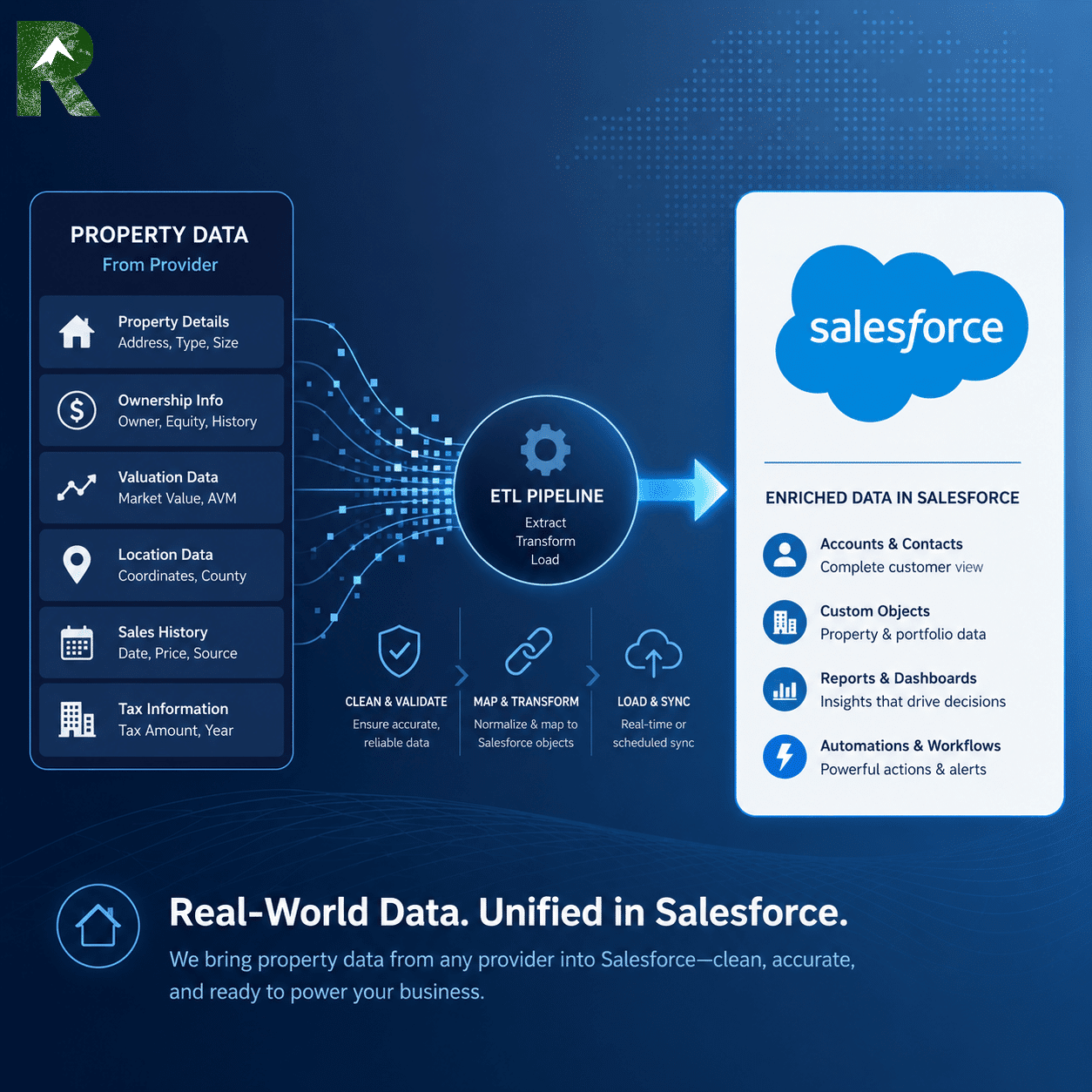
Their loan team was already working in Salesforce, but the property context behind those loans lived somewhere else. Listing status, price, days on market, sale information, and broker details had to be found outside the loan workflow. The scraper was one imagined mechanism. The actual need was reliable property context inside Salesforce, connected to the right loan and kept useful as the listing changed.
The first request was not the real requirement
This distinction matters in systems work. Clients often describe the tool they think should be built because that is the most concrete way they know to explain the pain. If I accept the proposed tool without examining the workflow, I may deliver exactly what they asked for and still miss what they needed.
I worked backward from the lending workflow instead. What property questions were people leaving Salesforce to answer? Which loan record should own the connection? Did the team need only the latest value, or did it need to know what changed? Which values came from the data source, which could users correct, and which should Salesforce calculate? How would anyone know whether the feed was still healthy?
Those questions changed the project. We were not designing a scraper. We were designing a property-data operating layer with an external source, a Salesforce model, automation, history, ownership rules, and monitoring.
The architecture had to cross an ownership boundary
I brought Blair at Hellsgate Consulting into the project and introduced him to the client. Blair owned the provider-side data work. I owned the Salesforce architecture, the client workflow, and the behavior users would experience.
My role sat between the client and the integration. I translated business needs into Salesforce records and automation, translated Salesforce constraints back into integration requirements, and kept the client and Blair aligned as both sides changed.
That meant managing more than a handoff. We had to agree on what identified a property or listing, which values the source could reliably provide, how updates would be recognized, what Salesforce should do when data was missing, and which system owned each field. A clean integration boundary is a set of responsibilities, not merely a connection that returns data.

External property data source
  -> provider-side collection and delivery
      -> Salesforce current-state property record
          <-> loan workflow
          -> field-level change history
          -> reports and health dashboard
We refined the Salesforce side for three months
The Salesforce design did not arrive fully formed. For roughly three months, I worked back and forth with the client and Blair, refining the objects, fields, matching behavior, Flows, user controls, and reporting surfaces.
Some changes came from seeing real provider data. Others came from watching how the client expected loan and property records to behave. A field that looks obvious in a sample payload can become ambiguous once a user edits it, a listing returns to market, a sale date appears, or two systems disagree about days on market.
That iteration was part of the architecture, not cleanup after it. The system needed to become legible to the people using it and maintainable by the people responsible for it.
The system was designed for continual synchronization
This was not a one-time property-data import. The provider-side process runs on a nightly schedule, checks for new or changed property information, and sends those updates into Salesforce.
That changed the architecture. Every synchronization had to recognize records the system already knew about, update current property state without creating unnecessary duplicates, preserve meaningful changes as history events, and leave behind enough evidence to show when Salesforce last received fresh data. The system was designed around repeated synchronization from the beginning, not occasional manual enrichment.
The goal was not to import more data
A raw property data import would have created another pile of fields. That was not the useful outcome.
The useful outcome was operational context: connect the right property record to the right loan, show the current listing state, preserve meaningful changes, distinguish automated updates from human edits, and make the whole thing observable.
The Salesforce model settled into three primary layers:
Loan record
  -> current property and listing record
      -> field-level change history
The loan remained the operating record. The property record held the current snapshot. The history records preserved the timeline. Reports and the dashboard sat above those layers rather than becoming another source of truth.
The first Flow coordinated the loan-to-property relationship
The first major Salesforce Flow runs from the loan side of the architecture. Its job is not simply to create a record. Its job is to coordinate identity and relationships without producing unnecessary duplicates.
At a high level, the Flow:
- Checks whether the loan already has a related property-detail record.
- Retrieves the loan’s property context.
- Looks for an existing property-detail record using the available identity and address context.
- Reuses and links the existing record when it finds a defensible match.
- Creates the supporting property-detail record when no match exists.
- Connects the resulting record back to the loan.
- Seeds selected lending context only when the destination value is still blank.
- Leaves administrative status information behind so the mapping result is inspectable.

This is closer to an orchestration Flow than a field-update Flow. It crosses the loan, property, and listing-data boundaries while trying to preserve one coherent relationship among them.
The check-first behavior is important. Record-triggered automation can run more than once as a record moves through a larger Salesforce process. The Flow therefore needs to recognize completed work and reuse existing state instead of treating every run as permission to create another record.
The data model separated current state from events
The current property record could hold listing status, list price, listing dates, days on market, sold date, sold price, broker information, provider identifiers, property address, and valuation context.
The exact fields mattered less than their ownership. Provider-fed facts, user-editable context, Salesforce-calculated values, identifiers, and administrative controls could not all be treated as the same kind of data.
For example, a days-on-market value received from a provider is not the same thing as a value calculated inside Salesforce. A human correction is not the same thing as an automated refresh. If those distinctions disappear, the CRM may still contain numbers, but nobody can confidently explain where they came from or which one should win.
The second Flow turned field changes into a timeline
The second major Flow watches the current property record after it changes. It compares the new record with its prior state and creates separate history events for the fields we decided were meaningful.
Each event can preserve:
- The property record that changed.
- The field that changed.
- The previous value.
- The new value.
- When the event occurred.
- The likely source of the change.
The tracked set includes the property and listing facts the client actually cared about: address and identifiers, listing status and dates, price and value fields, sale information, broker context, and other user-facing details.
The Flow also recognizes the integration path and stamps the current property record with the latest database-update time. That one control value later became the basis for a useful health indicator on the dashboard.
Property data is not static. A listing can move from active to pending to sold. Price, broker information, market status, and sale details can change independently. If Salesforce stores only the latest value, every update erases part of the story. The history layer made those changes reportable.
The source classification has an important boundary: it proves which Salesforce user or path wrote the record. It does not prove everything that happened upstream before the update reached Salesforce. Good observability includes saying what the evidence cannot tell you.
The Flows only made sense as part of the larger system
Neither Flow is especially useful in isolation. The mapping Flow depends on the loan and property model. The history Flow depends on clear field ownership. The provider integration depends on Salesforce having stable destinations. The dashboard depends on all three layers producing data with consistent meaning.
This is the part of Salesforce work that is easy to miss when automation is treated as a collection of disconnected Flow diagrams. The real architecture is the set of contracts between records, automations, people, and external systems:
- What event starts the work?
- Which record owns the relationship?
- How does the system recognize work it already completed?
- Which source owns each value?
- What happens when information is absent or contradictory?
- What evidence remains after the automation runs?
- How does an administrator tell healthy exceptions from actual failures?
I kept returning to those questions as the client, Blair, and I refined the system. They are what turned a proposed scraper into a maintained Salesforce capability.
The dashboard exposed two Salesforce reporting traps
After the data layer had been operating for a while, I realized we did not have a clear command center for it. I built an isolated report and dashboard package to show database freshness, property coverage, loan linkage, listing status, change volume, and records that needed review.
The first reporting trap was quiet. A custom report type inherited the provider-sync timestamp as its standard date field. Salesforce then applied a current-fiscal-quarter timeframe unless the report explicitly said otherwise. Older records disappeared. Records without a sync timestamp disappeared too.
Those blank-timestamp records were exactly the exceptions the operational dashboard needed to surface. The fix was to give every portfolio report an explicit all-time timeframe instead of trusting the report type’s default date behavior.
The second trap appeared when three dashboard metrics displayed this error:
This report cannot be used as the source for this component. If it is a summary or matrix report, add one or more groupings in the report. If it is a tabular report with a row limit, specify the Dashboard Settings in the report.
The reports returned the right records, but they were tabular reports that Salesforce would not accept as metric sources. Converting them into lightweight summary reports with valid groupings gave the dashboard components a usable grand total.
What the dashboard monitors now
The dashboard is intentionally closer to an object command center than an executive vanity board. It answers practical questions:
- When did Salesforce last receive a database update?
- How much property and change-history coverage exists?
- How many loan records are connected to property context?
- Which active loans have missing listing status, price, or enrichment information?
- What listing statuses appear across active loan properties?
- Which fields are changing, and are those changes coming from the automated path or from users?
The “last database update” metric is deliberately precise about what it proves. It shows the newest provider-update timestamp visible in Salesforce. It does not prove the last time the upstream process ran, attempted to run, or encountered an error.
What I would check first next time
- Discover the business outcome before accepting the requested mechanism as the requirement.
- Define record identity and matching rules before building the import path.
- Separate provider-owned, user-owned, and calculated fields.
- Preserve meaningful changes instead of overwriting the entire story.
- Record the source of a change while being honest about what that source can and cannot prove.
- Test custom report types for hidden standard-date filters, especially when blank dates are meaningful.
- Build the monitoring layer early enough that missing or stale records become visible.
The result
The property feed did not become valuable merely because it reached Salesforce. It became valuable because it was connected to the loan workflow, structured into records with clear roles, preserved as a timeline, and exposed through operational reporting.
The larger lesson is the one that changed the project at the beginning: a client may ask for a scraper, an integration, or a Flow, but the requested mechanism is not always the system they need. My job is to understand the operating outcome, design the relationships around it, and make the full chain observable enough to maintain.
That pattern travels well beyond private lending. External data becomes an operating asset when people can see it, trust its source, understand its history, and act on it without leaving the system where the work already happens.
System Debriefs are drafted from live working-session context by the engineering harness that did the work, then reviewed, verified, and published by me.
