
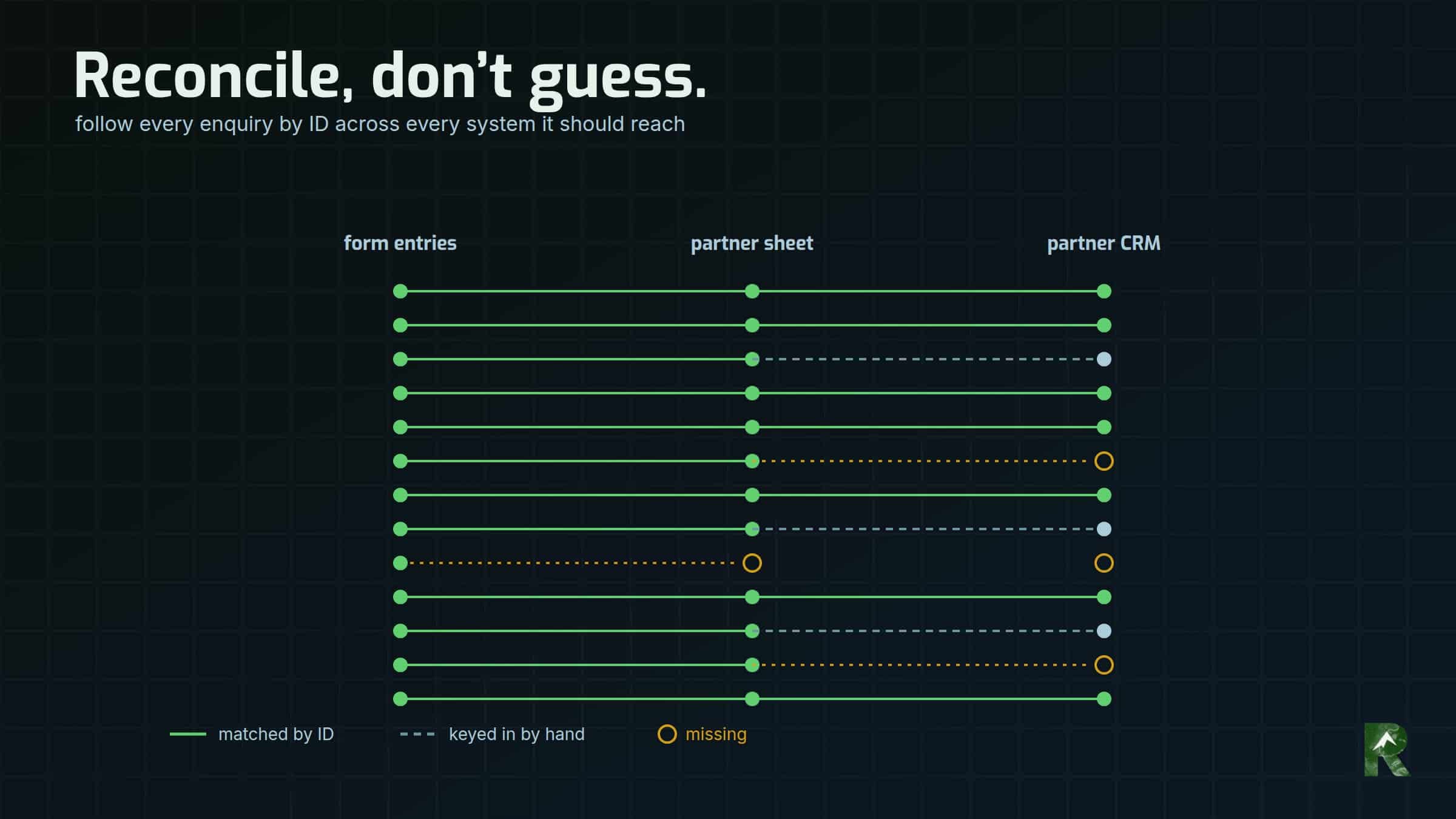
A South America travel company routes traveller enquiries to partner tour operators, and the largest partner also receives each one as a Lead in its own Salesforce org. On 28 September 2026 the company’s Pabbly Connect workflows were replaced by an n8n engine, live at 01:55 MDT.
The cutover note to that partner said: if you ever notice a gap where you’d expect an enquiry, tell me, and I can say exactly what happened to it. A few hours later they did. “We’ve been having missing leads daily.”
This is how that turned into an answer, why a count couldn’t have produced one, and how the same idea now runs every hour as a monitor.
Stack, as of September 2026: Gravity Forms 3.1 with the Webhooks add-on 1.7.0 on WordPress, n8n Cloud, a Google Sheet per partner, and the partner’s Salesforce org.
What did “missing leads daily” actually mean?
The partner gave two examples from the weekend. Both predated the cutover, and both were already in their Salesforce, keyed in by their own team, one of them six minutes after it arrived.
So “missing” meant “not in the CRM until a person typed it in”. They were right about that, and they’d been quietly covering for it.
Why couldn’t a count answer it?
It arrived on cutover day, on the cutover thread, so the obvious suspect was the new engine. But both examples predated it.
More importantly, “missing” hides at least three different failures, each with a different owner:
- the enquiry never reached the partner at all;
- it reached them by email but never got a CRM record;
- it’s in the CRM only because a person keyed it in.
“We sent X, you have Y” blends all three together.
The old platform didn’t help. Pabbly’s Partial Failed status meant a person had been emailed and a later step, usually the CRM write, hadn’t run. Its failure list read like lost leads, when most were only unrecorded.
And the middle of the old pipeline was dark to everyone except the account owner. As of September 2026, Pabbly Connect had no management API, so a workflow could only be inspected by clicking through it in a browser, and its run history sat in one person’s login. Any answer had to be built from the two ends: what the website captured, and what arrived at the partner.
Examples are where a complaint is loudest, not where the failure is. Both examples were fine. The population wasn’t.
How do you reconcile a pipeline you can’t see inside?
A note on pronouns: I say “we” in the investigation below. I was working alongside Claude Code in a live session, and we each caught things the other didn’t. The questions, the method and the calls about what to send the partner were mine.
Here’s the method, in order:
- Take every form entry from 1 September to the cutover, excluding our own tests.
- Define “reached the partner” as: the traveller’s email appears anywhere in that partner’s delivery sheet. That works because the old workflows wrote the sheet and emailed the partner before the CRM step.
- Look up each email in the partner’s production Salesforce, whoever created the Lead. The record’s creator tells the integration apart from a person.
- Remove tests, spam, and one enquiry that belonged to another partner under the routing rule.
- Then run it the other way: find enquiries the routing rule assigns to this partner that left no trace in the sheet or the CRM. That group is inferred, because we can’t see the partner’s inbox, and I say so wherever it’s used.
All of it was read-only. Nothing was written into the partner’s org.
Where did the “missing” leads actually go?
Of the enquiries that reached the partner by email in those four weeks, the old workflows silently failed to create the CRM record for roughly 3 in 10 of them.
The partner’s team had keyed most of those in by hand. Their own records were the evidence: the Lead’s creator was a person, not the integration. That deserves saying plainly, because it’s why nobody had noticed how bad the gap was.
About 9% never became a record at all. Before that list went anywhere, we re-checked every entry against production and read each one. A quarter of them weren’t travellers: two tour suppliers pitching partnerships, a brewery, and a request to buy a guest post on the blog. They’d come through the “chat with a travel expert” form and been delivered as leads. Everything left, about 7% of the partner’s enquiries, was a real traveller, and every one was a travel-guide download.
The failures clustered by form, which is exactly what per-form workflows produce. None on the quote form, about 4 in 10 on the trip builder, and most of the guide downloads.
The mechanism was the same everywhere. The old workflows emailed the partner and wrote the sheet first, and created the CRM record last. When an earlier step failed, the CRM step was skipped and the run was marked Partial Failed. In the one trip-builder failure I read step by step, the failing step was a phone-number formatter handed a submission with no phone number.
And a separate group, inferred, never reached the partner at all: roughly 1 in 7 of the enquiries the rule sends to them. Causes included a form that had never had a webhook, a region still routed to a former partner, a broken filter, and guide downloads the old system received but never delivered. Why that last group failed is still unread, because the run history was only ever visible in one login.
What was done with what it found?
The list went back to the partner as a spreadsheet, not as records. Anything written into their org is permanent and lands on their team’s queue, so what to do with each enquiry was their call. I offered to load them through the integration instead; they took the list.
The new engine, since cutover: the two leads caught in the morning’s credential failure had been covered by hand by the partner’s team, and every lead after that fix carried a Salesforce Id. A small sample, pointing the right way.
The reconciliation also caught a live defect in the new engine. One of the partner’s own two examples had been held during the shadow run, because the traveller typed their whole name into the first-name box and the last name arrived blank. In production, that enquiry would have reached no one; the old workflows had at least emailed it. It affects about one real traveller a month, all on the trip builder. The new engine was stricter than the old one in exactly the wrong place, and that’s mine. It was fixed and live by late morning, and no real traveller hit it in production before the fix.
How do you notice silent failure before a partner does?
The pipeline monitor, the canary, was already running that morning; it wasn’t built in response to the report. It’s the same idea, run every hour.
The old system’s defining flaw was silence. Nothing looks exactly like a quiet week. The new engine records every failure in a quarantine log, but recorded isn’t noticed. The design rule is to tell delivered nothing apart from nothing happened, and a zero-leads alert can’t: a genuinely quiet Sunday looks identical to a dead webhook.
So the canary reconciles against the upstream source of truth. Gravity Forms keeps every submission in its own gf_entry table whether or not any webhook fires, and every row the engine writes carries that entry’s ID. The canary follows each lead from entry to archive row to delivery or quarantine row, and where the chain breaks names the stop:
- the feed never ran;
- the webhook failed, with its HTTP code;
- n8n never received the run;
- the engine died partway;
- or the run succeeded but our log row went missing.
Gravity Forms supplies the first two itself: processed_feeds in the entry meta, and the entry note Webhook sent. Response code: 200.
IDs, not counts, and in both directions. A count can be balanced by a duplicate hiding a loss, and it breaks at window edges. Two matching zeroes on a quiet Sunday is still green, correctly. A delivery row with no upstream entry is a replay, a test or a forged request. The canary can’t tell which, so it doesn’t try; it reports that the row has no upstream and lets a person say which.
Before calling a gap a loss, ask n8n. The canary cross-checks against n8n’s own execution record, reading time and status only, never execution data. The reason: our Google Sheets logs measurably dropped rows under simultaneous appends while every execution reported success. So “run succeeded, row missing” is amber, not red.
The only count-based threshold sits upstream. It’s amber after 24 hours with no form entries at all, set slightly above the site’s longest natural gap since its May rebuild (23.2 hours). A “12 daytime hours” rule would have false-alarmed several times a month. Its honest blind spot is a form that breaks before the entry is saved.
The constraints are worth stating as they’re written:
- Not inside n8n. A canary hosted by the thing it watches can’t report that the thing is down.
- Read-only. A canary that acts is a second system that can fail.
- No personal data in alerts or stored snapshots: IDs, causes and counts only. Chat IDs are hashed, because they embed the traveller’s email.
- Quiet when healthy. A daily “all fine” email trains people to ignore it.
- Hourly, around the clock. Quiet hours apply to the alert, not the check: red goes out at any hour, and amber waits for morning.
It’s tested against fixtures, never by breaking production, because switching off a live feed to test it loses real leads. One fixture exists for a lesson I’d already paid for. Reconciling only the forms that have a live feed stops watching a form the moment its feed goes off, and never watches a form that never had one. A whole country’s guide downloads had sat on the website for months that way. The canary’s first run against live data found another form with no feed; that one takes almost nothing, so it sits on an ignore list with its reason and shows as ignored rather than disappearing.
Did the canary work on its first day?
Mostly, and the miss was mine. The first build counted the shadow run’s rows as deliveries and alerted on my own tests. Its first red alert, a minute after 09:00, was one of my test calls. It was fixed by 10:00:
- the cutover boundary now comes from the logs, not memory (I’d remembered the switch as “about 5 AM”; the logs say 01:55, and a 05:00 boundary would have hidden both real credential-window failures);
- hand-fired tests are listed but never counted, and they alert only if one reaches a real partner.
The first full alert raised nine items. Four were the real credential incident. Five were my own tests, flagged as rows with no upstream, which is the design working. Two of those were re-sends through production that nobody had written down, and the canary was the first thing to notice them.
One test item exposed a real bug. The phone workflow’s delivery log never recorded the Salesforce Id, even when the write succeeded, because it read the Id from the wrong upstream item. Left alone, the canary would have flagged every phone lead forever, and a monitor that cries wolf on every row gets filtered into a folder within a week. Then the real alert gets missed too.
I owned the alert wording as well. It called a CRM-write failure “NOT delivered until someone releases it”, but the partner had been emailed; only the CRM record was missing. Overstating it sends someone hunting for a lead that’s already been answered. The alert now says what it means, with one red per lead.
One build trap, for anyone reconciling phone calls: in the CallTrackingMetrics API, spam is an object on every call ({'risk': 'low', 'score': 0}), so a truthiness check on it skips every call. Our first version read “0 inbound”. Only excluded == True skips a call now. (As of September 2026.)
Can you test a CRM integration without writing a test record?
On 24 September, production access to the partner’s org was brand new, and a Lead written there can’t be deleted from our side. The planned production test inserts were on hold. What we did instead turned out to be worth more.
The engine builds the full Salesforce payload on every run, even with its Salesforce write switched off. So every real shadow-run execution had already produced the exact payload it would have sent. We swept those payloads and diffed every value against the org’s live legal values.
That found two live defects without inserting anything. The trip builder offered accommodation choices the partner’s field had no matching values for. And phone leads were sending a value into a field the partner had repurposed for something else. Both had passed a sandbox round-trip, because an unrestricted picklist stores whatever it’s sent and reads it back unchanged. “It stored what I sent” and “the value is valid” look identical.
Both are resolved: the second field no longer carries anything from us, and the first carries the traveller’s own choice, unchanged, which is what the partner asked for. The build now fails on any literal outside the org’s legal set.
Real executions are test fixtures you didn’t have to invent, and they carry the edge cases real travellers actually produce.
How do you know day one actually worked?
At 21:20 that night the question was: how did we do today? The check that answered it was independent of the dashboard. It reconciled four records: the form entries, the engine’s delivery log and quarantine, the partner’s production Salesforce read back by Id, and the call-tracking platform’s own call list.
- Every web entry since cutover was accounted for. The one that went to a different partner, an organic Peru guide download, was the right call. The day’s volume was in line with the month’s average.
- Every partner email was sent; each web delivery row carries a Gmail message Id.
- Every Salesforce Id the engine wrote, web and phone, read back from production with the right lead source, the right form value, and an owner assigned by the partner’s own rules.
- Both workflows showed zero errors and no drift from git.
- Quarantine held only known items.
The canary itself still said red that night, on the two credential-window leads, and that was correct. The engine never wrote those two records; the partner’s team covering them by hand doesn’t change what the pipeline did.
One correction, and it’s mine: I’d written that text messages would pile up in quarantine. They don’t. In this account, the call-tracking webhook never fires for a text, so texts never reach the engine at all; they sit in the call-tracking inbox, and nothing routes them. Whether the old system ever routed them, I don’t know. The docs were fixed the same day.
What I’d check first next time
- Get the examples, then reconcile the whole population anyway. Examples are where a complaint is loudest, not where the failure is.
- Split “missing” before answering: never arrived, arrived with no record, or recorded by a person. Each has a different owner and a different fix.
- Look at who created each record at the destination. People quietly covering for an integration are your evidence, and they deserve the credit.
- Stamp the source ID on every row you write, then reconcile by ID, never by count.
- Reconcile against the upstream source of truth, not your own configuration. A form with no feed is invisible to a check that starts from the feeds.
- Before any permanent test write into someone else’s system, sweep the payloads your real traffic already built. And re-check a “missing” list against production right before you send it: a quarter of ours weren’t travellers.
Part of a series. Six System Debriefs on rebuilding the lead routing of a South America travel company. This is part 6.
- From 51 Pabbly Connect workflows to three in n8n — why the old workflows were replaced rather than repaired.
- Every test green, every Salesforce write failing: scope parameter not supported — the credential failure behind the two leads that turn up in every check here.
- Writing Leads into a Salesforce org you don’t own — writing into a partner’s CRM you can’t see inside or delete from.
- Lead source tracking that decides routing: gclid, call tags and live chat — how a lead’s source decides which partner gets it.
- Changing a live n8n workflow without testing on real partners — how the blank-last-name fix shipped the same morning.
- Missing leads between web form and CRM: reconcile, don’t guess (this post)
System Debriefs are drafted from working-session context by the harness that did the work, then reviewed and published by me.
