
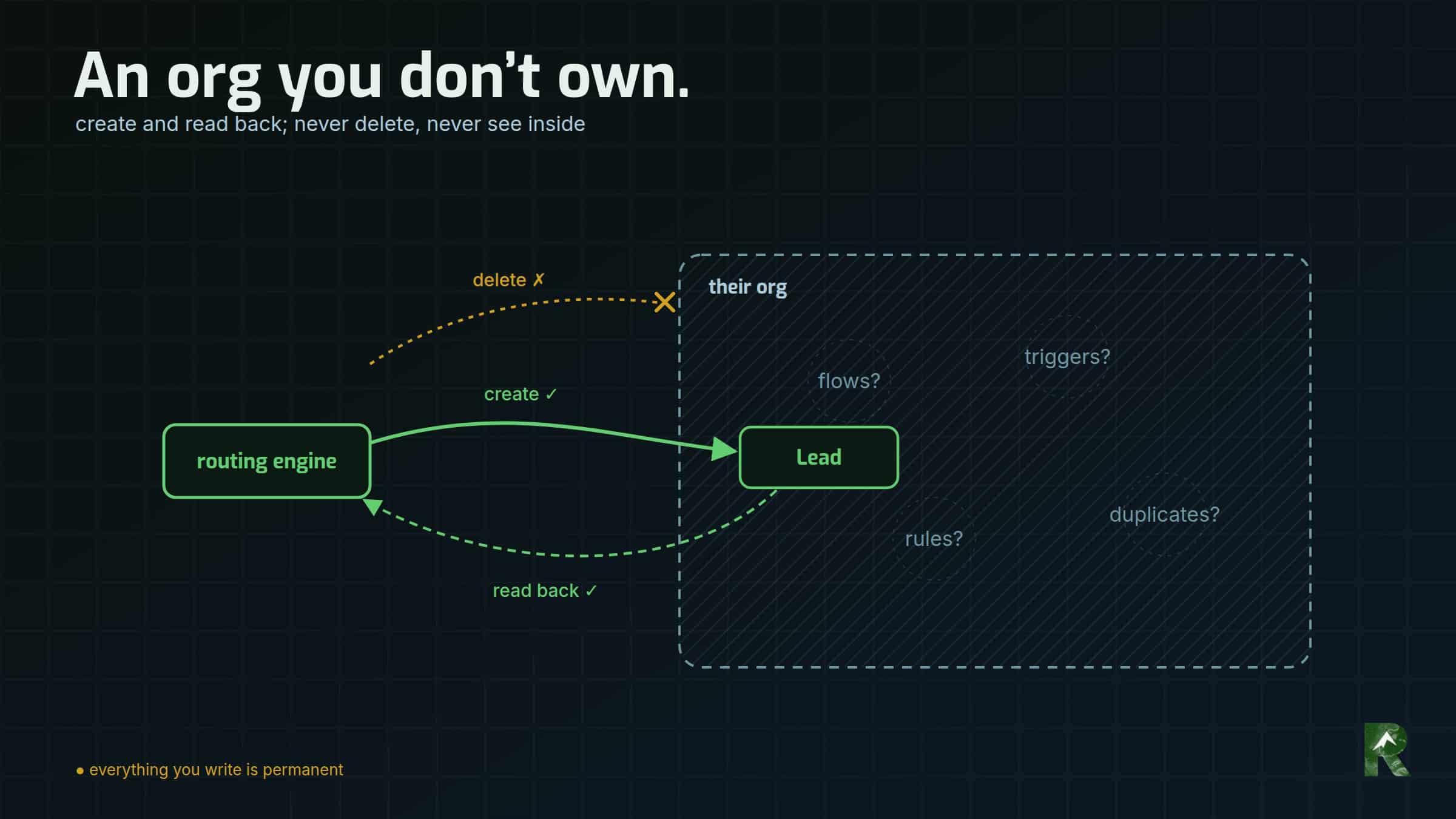
Here’s the situation this record is for. You have to create Leads in another company’s Salesforce org, through an integration user they set up for you. You can create and read, but you can’t delete. You can’t see the automation that fires when your records land. And their admins can see every login you make.
That was my position with a South America travel company’s largest partner, a tour operator that receives each of the company’s leads as a Lead in its own org. Since 28 September 2026 those Leads are written by an n8n routing engine, the workflow automation platform that replaced the company’s older integration. This is what writing into an org you don’t own actually involves, and what I’d do first next time.
Stack, as of September 2026: n8n Cloud, the HTTP Request node (v4.2) with n8n’s generic OAuth2 credential, the OAuth 2.0 client credentials flow, and Salesforce REST API v62.0.
What changes when the org isn’t yours?
The goal was narrow. Each enquiry becomes a Lead with the company’s own Lead Source and the right form value, placed by the partner’s own routing, with no other surprise on their side.
The constraints were the interesting part.
Create and read, never delete. A DELETE in their sandbox came back INSUFFICIENT_ACCESS_OR_READONLY. I never tried it in production, and the design assumes the same answer. Every record I write stays.
Lead only. Account, Contact and Opportunity aren’t blocked for the integration user; they’re absent from its object list entirely. That’s good least-privilege practice, and it also means the sender can’t see what becomes of a lead once it’s delivered.
Blind to whatever fires on insert. Asking the Metadata API anything returns INSUFFICIENT_ACCESS, because reading metadata needs Modify All Data or Modify Metadata, which an integration user shouldn’t have. Validation rules, triggers, flows, email alerts, assignment rules and duplicate rules are all invisible from where I sit.
Whoever owns the org decides what your user can do, and your test records land where their staff work.
What does the design look like when you can’t see or undo anything?
Containment, not certainty. Assume something invisible acts on every record, and arrange for its effect to land somewhere harmless.
- Validate on your side. One bad value rejects the whole Lead, and some fields never reject anything at all. So: send only the values production’s
describesays are legal, cap names to field length, drop impossible dates, and strip empty values from the body. - Read back every write. More on why below.
- No retry loop. A blind retry into an org you can’t delete from leaves permanent duplicates. A failed insert goes to a quarantine log for a person to look at, and the partner still gets the enquiry by email.
- Mode and org must agree. Production mode refuses a sandbox URL, sandbox mode refuses a production URL, and sandbox mode only writes my own plus-addressed test addresses.
How does an API-only user authenticate?
The client credentials flow lets a server get an access token as a pre-assigned “Run-As” user, with no browser, no password and no security token. The other side creates a connected app (Salesforce’s record of an integration) and gives you its consumer key and secret.
Getting there took three tries, and the order is the useful part. SOAP login wanted a security token. The OAuth username-password flow returned invalid_grant. The client credentials flow returned no client credentials user enabled, and that one was good news: it proved the consumer key and secret were valid. The only thing missing was the Run-As user, which is one setting on the connected app. The partner set it, and it worked.
Before the first insert, check createable in describe, on Lead and on every field you’ll map. API access doesn’t imply field access.
The token request goes to the org’s My Domain: https://<your-domain>.my.salesforce.com/services/oauth2/token. Salesforce’s documentation for this flow specifies that host, and the generic login.salesforce.com doesn’t work for it. Production credentials arrived without a hostname. I derived it from the sandbox’s, which follows the pattern <org>--<sandbox>.sandbox.my.salesforce.com, because a wrong guess fails closed, and the instance_url in the token response confirmed it.
In n8n, the built-in Salesforce credential offers JWT or the browser-based authorization-code flow. An API-only user can’t click through a consent screen, so the integration uses n8n’s generic OAuth2 credential with the grant type set to Client Credentials, and an HTTP Request node posting to /services/data/v62.0/sobjects/Lead. (As of October 2026.)
One warning, because I learned it the expensive way: don’t put anything in the credential’s Scope field. Salesforce answers scope parameter not supported and no token is issued. I broke production with exactly that on cutover day; that incident has its own record.
Why is every token request a problem?
Each token Salesforce issues is a row in the Run-As user’s login history, stamped with the connected app’s name, and visible to the org’s admins.
My own command-line client minted a fresh token per command. One day of reads and tests left 96 login rows in their history, including bursts of nine inside 15 seconds. To an admin, that reads as automation rattling the door.
The fix was a token cache:
- keep the token for 45 minutes, well inside a default two-hour session, and refresh it early;
- store it with owner-only permissions, outside the repository;
- on a
401, discard the cache, mint once and retry; - treat a corrupt cache as a cache miss.
I tested it by poisoning the cache with a bad token and with garbage. Six calls on a warm cache produced zero new login rows.
n8n’s OAuth2 credential mints and refreshes its own token. I haven’t measured its footprint in their login history, and I’m not claiming it’s minimal.
Being a guest in someone’s org means your footprint should be proportional to your work.
Where does a new Lead go, and how do you keep tests off their queue?
The REST API’s Sforce-Auto-Assign header decides whether the org’s assignment rules run on your insert. When the header is absent, Salesforce defaults it to true and the active rules run.
In their sandbox I watched exactly that. An insert without the header moved from the integration user to a working queue about two seconds later. With Sforce-Auto-Assign: false, every insert stayed where I put it.
So the rule splits by environment:
- Outside production: send
Sforce-Auto-Assign: falseand pinOwnerIdto the integration user, so any owner notification reaches me and not their staff. - In production: send neither. Their assignment rules place the lead, which is what the partner asked for, and no hard-coded queue Id ever goes in the payload.
In the n8n node it’s one header whose expression returns false outside production and nothing at all in production.
I proved both halves. The production test inserts ran with the header deliberately absent and landed on their working queue, which is what made the test meaningful. At the end of the first live day, every Lead the engine had written read back with an owner set by the partner’s own rules.
A sandbox isn’t mail-proof, either. Salesforce appends .invalid to user emails when it creates a sandbox, but that’s a starting state, and an admin can change it.
Which picklist values are actually legal?
A picklist is a field with a fixed list of values. A restricted picklist rejects anything that isn’t on its list. A dependent picklist’s legal values depend on another field, the controlling field.
The field that records which form produced a lead was both: restricted, and dependent on Lead Source. The company always sends one Lead Source, so only a minority of that field’s list was legal for us. Several of the illegal values looked more natural for the company’s forms than the legal ones did. A mapping built from the flat list would have failed on first contact.
Tested: a value that isn’t on the list at all comes back HTTP 400 with INVALID_OR_NULL_FOR_RESTRICTED_PICKLIST, names the field, and creates nothing.
Not tested, deliberately: a value that’s legal only under a different Lead Source. Every test write is permanent, so I stayed inside the legal subset rather than prove the rejection with a record I could never remove.
describe gives each dependent value a validFor property: a base64-encoded bitmap with one bit per value of the controlling field. To get the legal subset, decode it at your controlling value’s position in the controlling field’s picklistValues:
import base64

def is_valid_for(valid_for_b64, controller_index):
    """True if this dependent value is legal when the controlling field
    holds the value at controller_index in its describe picklistValues."""
    bits = base64.b64decode(valid_for_b64)
    return bool(bits[controller_index >> 3] & (0x80 >> (controller_index % 8)))
I checked that function against a real org’s describe before publishing it, and it reproduced the legal subset exactly. Diffing the flat list answers the wrong question.
Map every form to that subset, and never derive the value from a form’s title.
Re-decode in production; don’t assume. Here production matched the sandbox exactly, and every value the live workflows send was in the subset, checked against the live workflow JSON rather than the spec.
Then pin it in a build check. The legal values read from production sit in the workflow’s syntax checker, and the build fails on any literal outside them, with the dependent field checked against the subset rather than the flat list.
Why did two wrong values pass every sandbox test?
Because some picklists accept anything. I sent ZZ-Ryzodus-Bogus to an unrestricted picklist in their sandbox. Salesforce answered HTTP 201 and stored it verbatim. restrictedPicklist: false in describe is the only warning you get.
So a sandbox round-trip proves nothing about validity. “It stored what I sent” and “the value is valid” look identical.
Here’s how the two were caught. On 24 September, with production access but before any production insert, I took every payload the live engine had already built during its shadow run and diffed every value against production’s picklists. That found two live defects on two unrestricted fields, one in the web-form workflow and one in the phone-call workflow. Both had passed sandbox testing, and finding them inserted nothing. Two test inserts would have exercised two values. The diff exercised every value the engine had actually built.
One was a value carried over from the previous integration’s mapping. The partner later confirmed that field should carry nothing from us, so it’s gone. The other turned into the correction below.
Other ways a single field sinks the whole insert, all guarded on our side: an impossible calendar date, a blank date, and a name longer than its field.
How do you test when nothing can be deleted?
Every test write is permanent and visible to their staff, and your own log is the only record of it. Append the log row before moving on. An unlogged record in someone else’s org is an orphan.
The recipe is enforced in code rather than remembered:
- the assignment header off and the owner pinned;
- an obviously synthetic, numbered name (
Ryzodus-Test-07A) that explains itself to anyone who finds it; - a unique plus-address per record;
- no phone numbers;
- the Lead object only.
My command-line client refuses any payload that breaks the recipe, and I tested each refusal by attempting the violation.
Use a unique address per record because records that share an email can meet matching logic you can’t see, and then the test isn’t testing one thing anymore. And give every record one question to answer, with a control beside it. They’re permanent, so make each one count.
The engine’s sandbox gate earned its keep during the shadow run. Five real leads came in while it was armed for a test, and none of them reached Salesforce.
Production is read-only by default in my client. Only an explicit flag selects it, with no environment variable and no config default; its credential lives in a separate file; and write commands refuse before a token is even requested.
The production test, on cutover day: two records, agreed with the partner in advance and named so they’d recognise them. Assignment rules were deliberately left on so the test ran the real path. Both landed on their working queue, and both are permanent.
How do you know the write landed as sent?
HTTP 201 with success: true means a record was created. It doesn’t mean the record holds what you sent. Automation you can’t see can change fields during the insert.
Equal CreatedDate and LastModifiedDate don’t settle it either. They show nothing touched the record afterwards. A before-save flow or trigger rewrites fields inside the insert itself, and the two timestamps still match.
So both workflows read back every Lead they create, by Id. The web engine also compares the stored name with the one it sent, and logs any difference in the company’s own delivery log instead of raising an error. That behaviour belongs to their org, and the company’s copy of what the traveller typed stays the source of truth.
For tests, read back with FIELDS(ALL) a minute or so later and compare every field you sent.
At the end of day one I read every engine-written Lead back from production by Id. Each carried its source and form value as sent, and the name check had flagged nothing.
What broke along the way?
The test my notes said never happened. On 9 September, before any write recipe existed, a test Lead went into their sandbox without the assignment header, and their rules moved it onto a working queue within seconds. My project log, written an hour later, said no test insert had been attempted. I found the record by reading the org, not my notes. Whether it notified anyone, I couldn’t see. The recipe above exists because of it.
I corrected the wrong thing. The partner asked me to keep the company’s distinction between two accommodation tiers on an unrestricted field. I did it by sending two values I’d made up, which were in nobody’s vocabulary. A few days later the production audit flagged those values as off-list, and I “fixed” them by collapsing both onto one of the partner’s existing values. That overrode what they’d told me they wanted. When they saw it, they told me exactly what they did want: the company’s own labels, the ones travellers pick on the website. So I deleted the mapping layer. The traveller’s own choice now goes through unchanged, as the same string in the Lead, the partner’s sheet and the message. The build check that pinned that field is gone too, with the reason written beside it so nobody re-adds it.
Inventing values was a real defect. Conforming to their list was the wrong repair. An unrestricted picklist usually means the owner chose to accept outside vocabulary, so ask the field’s owner what they want before you map onto their values.
Where did it land?
Live since 28 September 2026. The web-form engine and the phone-call workflow write Leads the same way, and every engine-written Lead on day one read back with its source, form value and owner correct. The build fails if a pinned value ever becomes illegal. Every test record left behind, about twenty in their sandbox and two in production, is logged and named for what it is.
What doesn’t it do?
As of October 2026:
- No closed loop. A Lead-only user can’t see conversion or outcome, so this can’t promise attribution through to a booking.
- Still blind to their automation. The next surprise will arrive as a failed or altered write. Read-back and quarantine exist to catch it.
- The pinned values are a snapshot. A schema change on their side stays invisible until a write fails or someone re-reads
describe. - Still untested: the cross-controller picklist rejection, delete in production, and the n8n credential’s login footprint.
What would I do first next time?
- Ask for the client credentials flow with an API-only Run-As user, a token endpoint on their My Domain, and no
scope. - Run
describeon every field you’ll write. Checkcreateable,restrictedPicklist, the dependency and itsvalidForat your controlling value, and the field length. - Diff the values you’ve actually built against production’s
describe, not your spec, and pin them in a build check. - Before you map onto someone’s unrestricted picklist, ask the field’s owner.
- Test by recipe: assignment header off, owner pinned, unique synthetic identities, one question per record, and a log of every record. Agree any production test in advance.
- Read back every write, and keep your own copy of what you sent.
- Cache your tokens.
Part of a series. Six System Debriefs on rebuilding the lead routing of a South America travel company. This is part 3.
- From 51 Pabbly Connect workflows to three in n8n — the routing engine these Leads come from.
- Every test green, every Salesforce write failing: scope parameter not supported — the day this integration’s credential broke, and what it cost.
- Writing Leads into a Salesforce org you don’t own (this post)
- Lead source tracking that decides routing: gclid, call tags and live chat — how a lead’s source decides which partner gets it.
- Changing a live n8n workflow without testing on real partners — how a change is made and proven before it reaches a partner.
- Missing leads between web form and CRM: reconcile, don’t guess — finding which leads went missing, and where.
System Debriefs are drafted from working-session context by the harness that did the work, then reviewed and published by me.
