
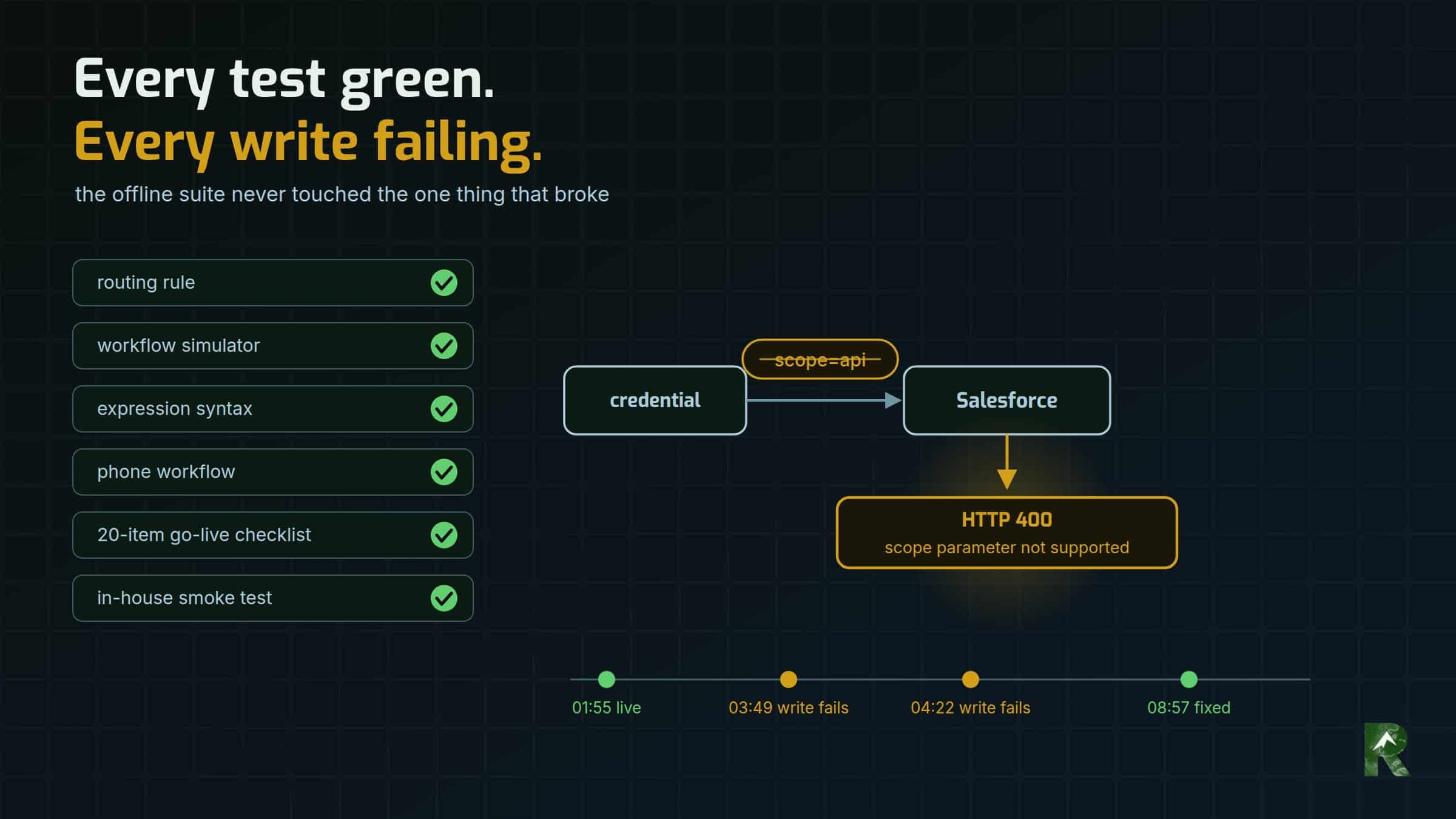
If you landed here from a search box, this is probably the response you’re looking at, from a Salesforce token request using the OAuth 2.0 client credentials grant:
HTTP 400 {"error":"invalid_request","error_description":"scope parameter not supported"}The fix: take scope out of the request. On this grant Salesforce reports the scope in its token response; it doesn’t accept one in the request. The rest of this record is how that one field broke a production integration for the first seven hours it was live, and why every test I had said it was fine.
Stack, as of September 2026:
- n8n Cloud, the workflow automation platform. The HTTP Request node (v4.2) used n8n’s generic OAuth2 credential with the grant type set to Client Credentials, which is server-to-server: no person ever logs in. n8n’s built-in Salesforce credential expects either a person signing in through a browser or a JWT certificate, so this integration didn’t use it.
- Salesforce REST API v62.0, creating records with
POST /services/data/v62.0/sobjects/Lead. - My Domain, which is your org’s own Salesforce hostname. It matters here, as you’ll see.
The integration belongs to a South America travel company that routes traveller enquiries to partner tour operators. The largest partner also receives every lead as a Lead in its own Salesforce org. On 28 September 2026 that routing moved from Pabbly Connect workflows to n8n.
What broke on cutover day?
The new engine went to production at 01:55 MDT on 28 September, with the old workflows switched off first.
Two real enquiries for the largest partner arrived at 03:49 and 04:22. Both reached the partner by email and both landed in its lead sheet. Neither created a Salesforce Lead.
Both were logged as Salesforce failures with the partner still emailed, which is the design working. A failed insert still emails the partner and records the failure for a person to look at. There’s deliberately no automatic retry, because every write into that org is permanent from our side. I’d tested that path on purpose before launch, by pointing the Salesforce step at a host that didn’t exist.
What the failure log lacked was a reason. It stored this, and only this:
{"level":"warning","shouldReport":false,"tags":{}}No HTTP status, no message. And n8n itself showed nothing wrong. The Salesforce node sends errors to its error output (the node’s On Error setting, continueErrorOutput in the workflow JSON), so n8n marked the whole execution as successful, and the Salesforce node too. The item that failed sat on the error branch carrying that same empty object. Any alert built on execution status would have stayed silent all day.

I found it on the first morning check of the failure log, a few hours in.
Why did every test say it was fine?
Because none of them touched the one thing that was broken.
The offline suite never saw the credential. The local simulator that runs the workflow’s own expressions, the expression-syntax checker and the routing tests all run offline. That’s what makes them fast and safe, and it’s also why they can’t see a credential.
The suite could see the instance URL but not the credential behind it. It even asserted that the configured Salesforce URL was a My Domain host. The credential lives inside n8n, and the workflow file refers to it only by id and name.
The production checks ran through a different client. Before cutover I ran a 20-item go-live checklist against the production org, finished with two controlled test inserts. Those went through a small Python client of mine, whose token request sends grant_type, client_id and client_secret, and nothing else. Every check passed, honestly. None of them was checking n8n’s credential.
The production credential was the only new piece. The sandbox credential had been writing through the same nodes since 17 September. The production one was created on cutover morning. It was the only part of the Salesforce path that had never run.
No synthetic lead went through production n8n at cutover, on purpose. In production a test lead emails a real partner and creates a record we can’t delete, so the plan was to watch the first real leads instead. The two post-switch smoke tests routed in-house, which touches no partner and no CRM.
Put those together and the first write ever made through the production credential was a real traveller’s enquiry.
How did I find it?
The failure log had no reason, and the execution history said success. So I reproduced the token request outside n8n and changed one variable:
no scope param : OK  scope=api
scope=api      : HTTP 400 {"error":"invalid_request","error_description":"scope parameter not supported"}
The token URL wasn’t the problem. It had been the org’s My Domain endpoint all along, and the fix changed nothing but the scope.
What was actually wrong?
I broke this myself. The production credential carried scope: "api", and Salesforce’s client credentials flow rejects the scope parameter outright.
Here’s how it got there. api is the scope Salesforce reports in the token response. I’d noted it four days earlier, when production access was first proven, and when I built the n8n credential I put it in the Scope field. Salesforce returns the scope on this grant. It doesn’t accept one. Salesforce will tell you your scope; it won’t take suggestions.
The field invites it, because the spec allows it. The OAuth 2.0 specification (RFC 6749, section 4.4.2) lists scope as an optional parameter on a client credentials request. But Salesforce’s documentation for this flow lists three parameters, grant_type, client_id and client_secret, and the client ID and secret can travel in a Basic auth header instead. Scope isn’t one of them. n8n’s own credential docs note that most services don’t support scopes on this grant. (All as of October 2026.)
Why every write failed, not some: n8n requests the token itself, for every node that uses the credential. No token meant every Salesforce node failed, and every lead fell to its error output.
The neighbouring rule, because it’s probably your next search: the token request goes to your org’s My Domain, https://<your-domain>.my.salesforce.com/services/oauth2/token. The client credentials flow doesn’t work against the generic login.salesforce.com host.
How was it fixed?
- A new credential with no scope, and four nodes repointed to it: the create and the read-back, in both the web-form workflow and the phone-call workflow. Then both workflows pushed.
- The broken credential deleted, so nobody can pick it from a dropdown later.
- The rule written where the next person to touch it will read it: never put
scopeon the Salesforce credential.
The failure log’s missing reason wasn’t fixed that day. It’s still open; more below.
How do you prove a credential fix without bothering a partner?
The standing rule since that morning: after any credential or endpoint change, prove it with a live write through the real integration. Tests don’t count.
The vehicle was the phone-call workflow, which takes call events from CallTrackingMetrics and has no email step at all. With its spreadsheet writes switched to log-only for a few minutes, one synthetic call event, clearly labelled as a test, could reach nothing but Salesforce. At 08:57 it created a Lead in production and read it back, and the workflow went straight back to normal.
One write proved both workflows, because they share the credential.
The honest cost: one test record in the partner’s production org that I can’t delete from my side. It was named as a test, and the partner’s team spotted it and removed it that afternoon.
The next real lead for the partner arrived at 09:05 and wrote clean. By the end of the day every Salesforce write since the fix had been read back from the org.
Why didn’t I replay the two failed leads?
Judge a person not by the mistake but by how they move to correct it. The correction is also where the second incident usually starts.
The two failed leads’ payloads were recovered from their runs and staged. My tooling for that org refuses to write anything but a test identity, so sending real traveller data through it was a deliberate override, and I approved it.
Before sending anything, I checked whether the records already existed. They did. The partner already had both travellers in its CRM, entered within minutes of our email, and was already talking to both of them.
A replay would have created two permanent duplicate Leads for travellers already in conversation, in an org I can’t delete from. I stopped it before anything was written. The workflow has no automatic retry for exactly this reason, and a replay is a manual retry.
Before replaying anything into a system you can’t delete from, check whether the record is already there.
What did the outage cost?
Not the leads. Both reached the partner by email, and both were being worked that same morning.
It cost the attribution. The records the partner created for those two didn’t carry the travel company as the source, so in the partner’s own reporting those leads came from nowhere.
That’s the general shape. When a CRM write fails in a referral pipeline, the lead survives and the credit doesn’t, and the sender can only see it as a row in its own failure log. That’s the real case for reading the failure log every day.
What’s still open?
As of 2 October 2026, the failure log still stores n8n’s error object for the HTTP node, which carries no status and no message. It needs the HTTP status and the response body, or the next incident gets diagnosed from execution history too.
What I’d check first next time
- If a Salesforce client credentials token request returns
scope parameter not supported, remove the scope and read the granted scope from the token response. - Make sure the token URL is your org’s My Domain, not
login.salesforce.com. - After any credential or endpoint change, make one live write through the real integration, not through your own script.
- Build that write so it reaches only the system under test.
- Don’t trust execution status when errors are routed to an error output. Watch the error branch’s destination.
- Make the failure log capture the HTTP status and the response body.
- Before replaying into a system you can’t delete from, check whether the record already exists.
- Once a credential is replaced, delete the broken one.
Part of a series. Six System Debriefs on rebuilding the lead routing of a South America travel company. This is part 2.
- From 51 Pabbly Connect workflows to three in n8n — the migration this cutover finished.
- Every test green, every Salesforce write failing: scope parameter not supported (this post)
- Writing Leads into a Salesforce org you don’t own — writing into a partner’s CRM you can’t see inside or delete from.
- Lead source tracking that decides routing: gclid, call tags and live chat — how a lead’s source decides which partner gets it.
- Changing a live n8n workflow without testing on real partners — how a change is made and proven before it reaches a partner.
- Missing leads between web form and CRM: reconcile, don’t guess — finding which leads went missing, and where.
System Debriefs are drafted from working-session context by the harness that did the work, then reviewed and published by me.
